Team and roles: invitations and permissions
Invite people at Settings → Members → Invite people; a role (owner, admin, accountant, member, viewer) decides what they can issue and change.
You invite people at Settings → Members with Invite people; each person gets a role that limits their permissions, and an invitation takes up a seat on your plan.
Where to find it: Settings → Members (managed by owners and admins) and Settings → Roles with the permission table.
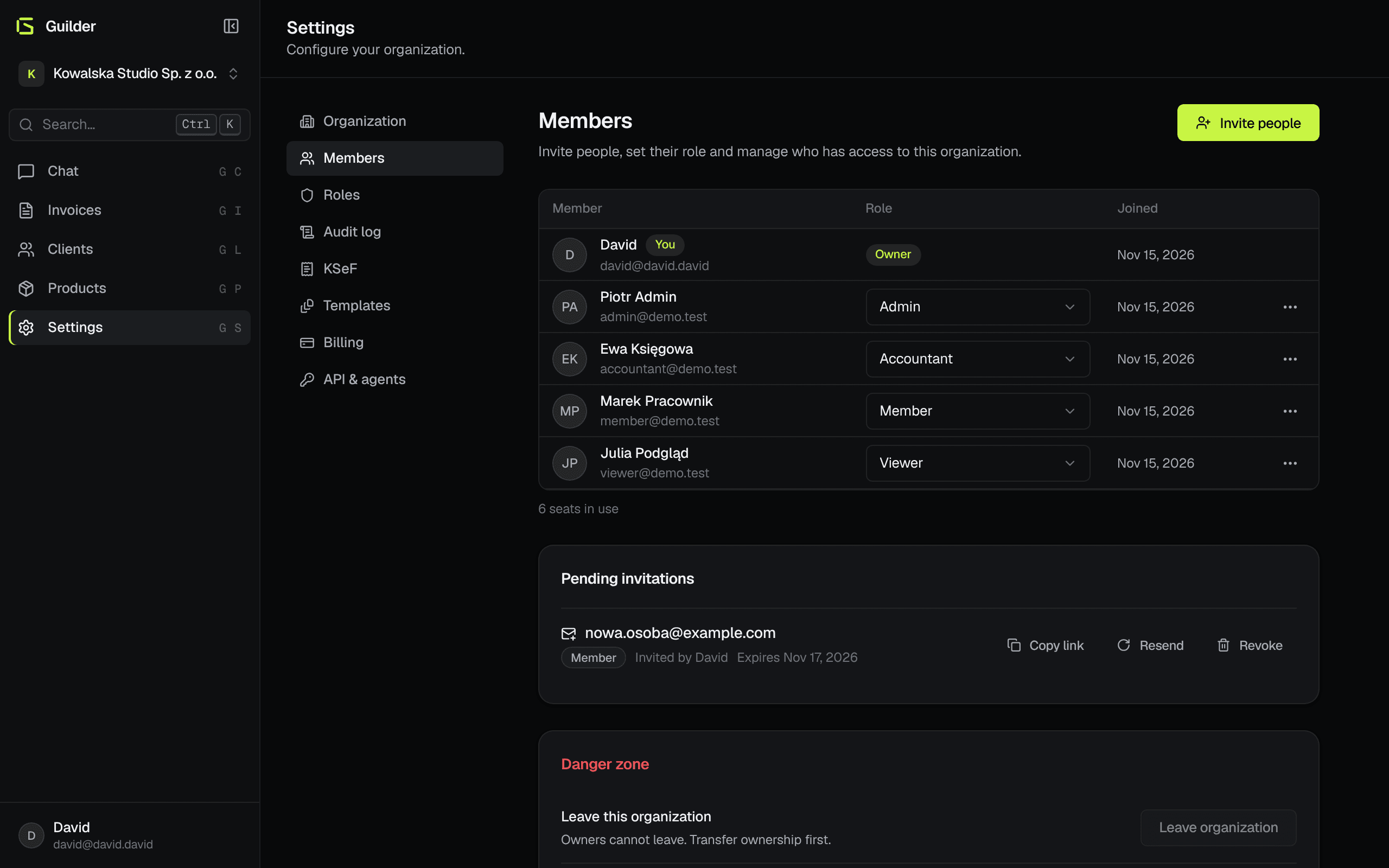
Steps
- Open Settings → Members and click Invite people.
- In E-mail addresses enter one or more addresses, separated by commas, spaces or new lines.
- Choose the Role.
- Click Send invitations. The person gets an e-mail with a link valid for 7 days.
- Pending invitations appear under "Pending invitations". You can Resend, Revoke or Copy link.
- Change an existing member's role in the Role column. Remove from organization cuts access immediately; the documents stay.
Roles
- Owner: full control, including billing, ownership transfer and deleting the organization.
- Admin: members, templates, KSeF, API access and settings. No billing.
- Accountant: issues invoices, sends them to KSeF, records payments. No team or settings access.
- Member: prepares drafts, clients and products. Cannot issue documents.
- Viewer: read-only.
Tips
- Pending invitations count towards the seat limit. The Free plan has 2 seats.
- You transfer ownership at Settings → Members → Transfer ownership. The previous owner becomes an admin.
- Only the owner can manage the plan and billing (plans and billing).
- A member leaves with Leave organization. An owner transfers ownership first.
Related articles
- Plans, limits and billingThe Free plan has 2 seats, 25 invoices and 50 assistant messages a month. Pro at PLN 29 per seat per month removes limits and adds API and MCP.
- Connect to KSeF: token and environmentConnect your company to KSeF at Settings → KSeF: pick an environment, paste a token from the Taxpayer Application, click Save token, then Verify.
- API keys and the REST APICreate an API key at Settings → API & agents → Create key (Pro plan) and call the REST API at /api/v1 with an Authorization: Bearer header. A key shows once.