Plans, limits and billing
The Free plan has 2 seats, 25 invoices and 50 assistant messages a month. Pro at PLN 29 per seat per month removes limits and adds API and MCP.
The Free plan costs PLN 0 and has limits (2 seats, 25 issued invoices and 50 assistant messages a month), while Pro costs PLN 29 per seat per month and removes the limits.
Where to find it: Settings → Billing. The organization owner manages the plan.
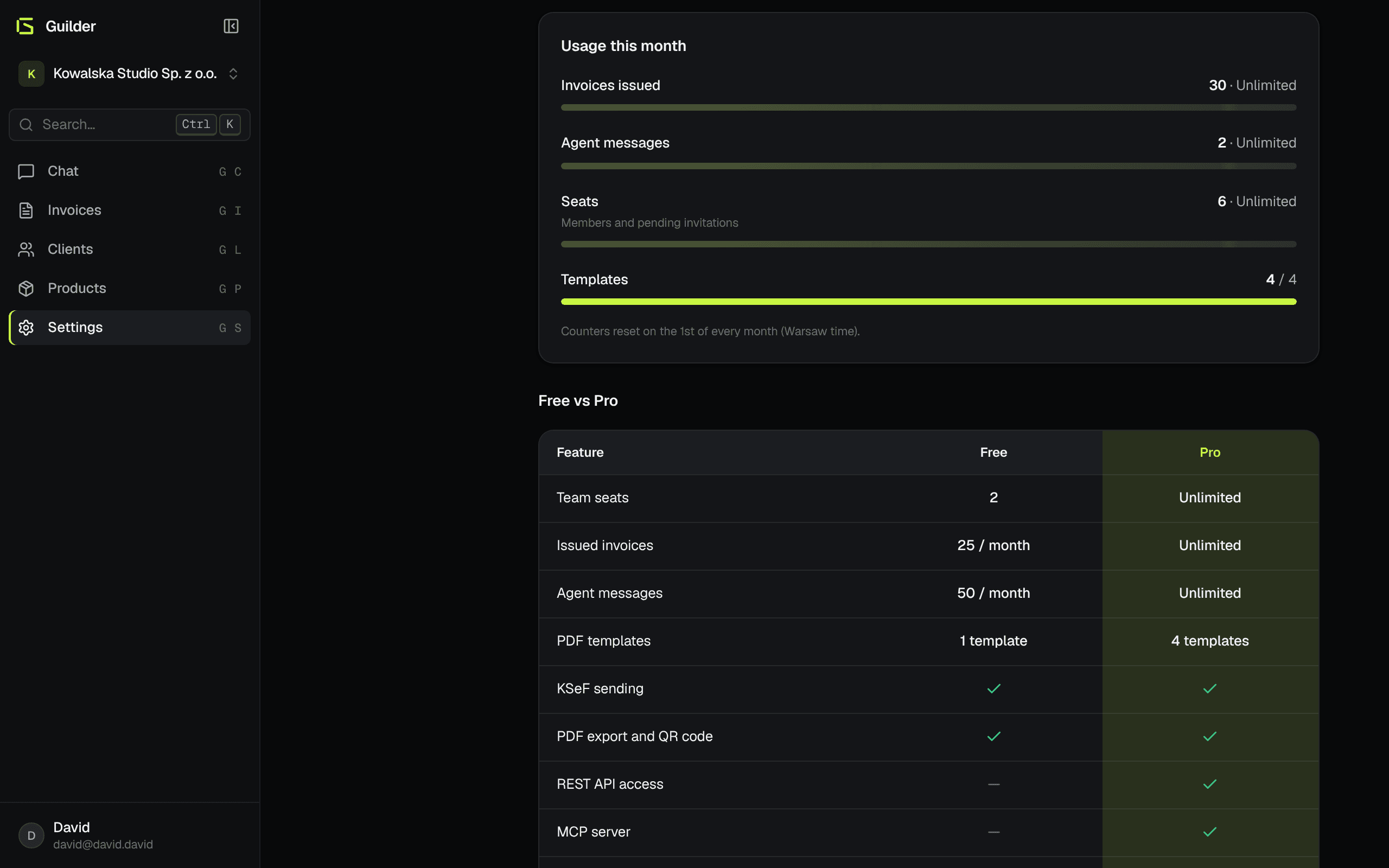
Comparison
| Free | Pro | |
|---|---|---|
| Price | PLN 0 | PLN 29 per seat / month (yearly: 2 months free) |
| Organizations | 1 | unlimited |
| Team seats | 2 | unlimited |
| Invoices issued | 25 / month | unlimited |
| Agent messages | 50 / month | unlimited |
| PDF templates | 1 (Minimal) | 4 |
| Sending to KSeF, PDF with QR code | yes | yes |
| REST API and MCP server | no | yes |
Steps
- Open Settings → Billing.
- Check Usage this month: invoices issued, agent messages, seats and templates. Counters reset on the 1st of every month (Warsaw time).
- Choose the interval: Monthly or Yearly (if available), then Upgrade to Pro. Stripe handles payment.
- Change or cancel the plan in Manage billing (Stripe portal). Pro stays active until the end of the paid period.
- Subscription invoices are listed in the Invoices section of the same page, and you enter your NIP during checkout.
Tips
- When you hit a limit you see "Plan limit reached". Nothing is lost; upgrade to Pro or wait for the next month.
- Every member takes a seat, and so does a pending invitation. Adding or removing a person updates the subscription.
- People without the owner role see the plan and usage but cannot change the plan.
Related articles
- Team and roles: invitations and permissionsInvite people at Settings → Members → Invite people; a role (owner, admin, accountant, member, viewer) decides what they can issue and change.
- AI assistant: invoicing from chatThe assistant in the Chat menu drafts invoices, finds clients and runs summaries; issuing, KSeF sending and payments need your confirmation on a card.
- API keys and the REST APICreate an API key at Settings → API & agents → Create key (Pro plan) and call the REST API at /api/v1 with an Authorization: Bearer header. A key shows once.