AI assistant: invoicing from chat
The assistant in the Chat menu drafts invoices, finds clients and runs summaries; issuing, KSeF sending and payments need your confirmation on a card.
The AI assistant lives in the Chat menu: you describe a sale in your own words and it prepares a draft invoice; it runs irreversible actions only after you click on a confirmation card.
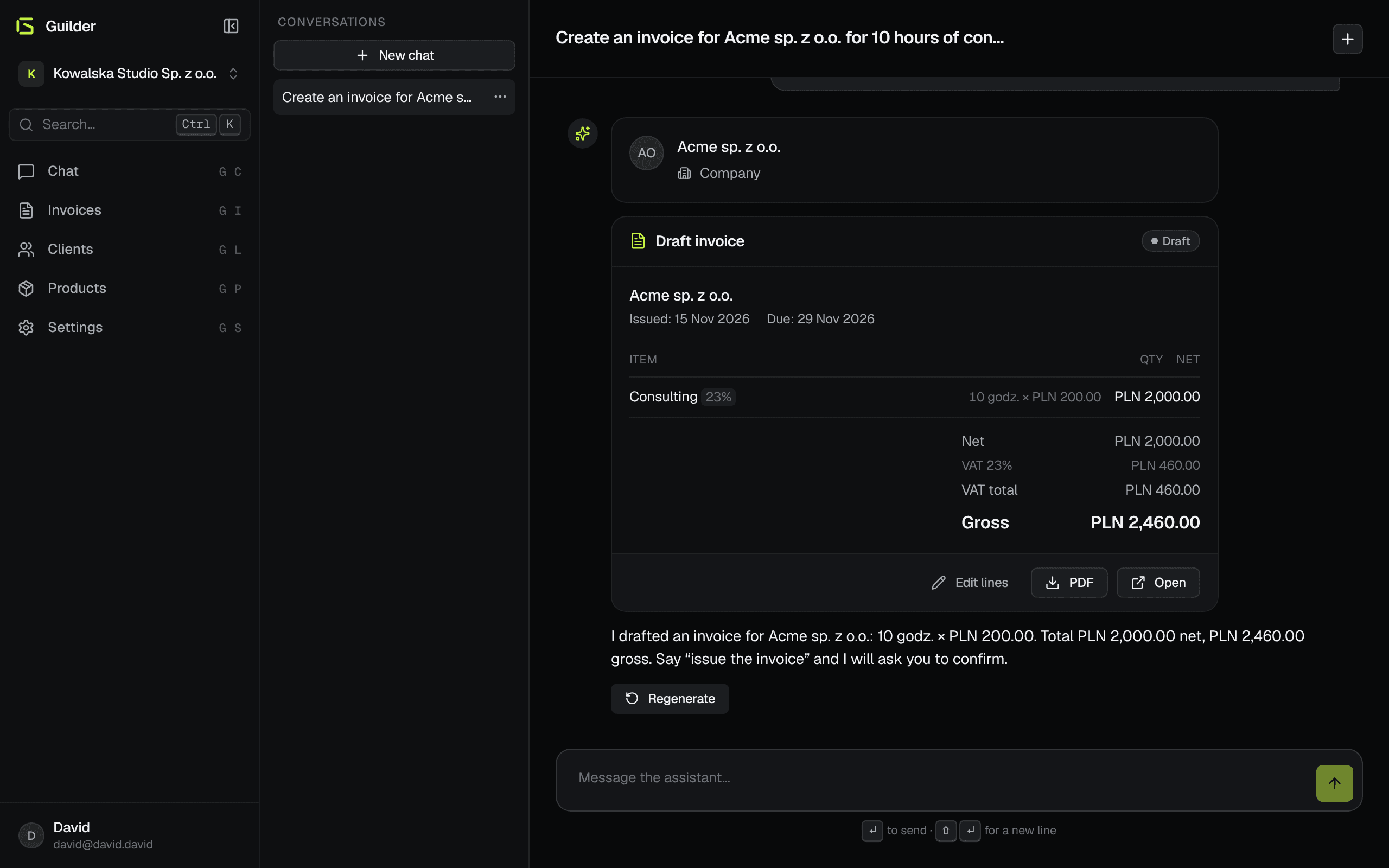
Where to find it: the Chat menu (the organization home page). The "Message the assistant…" field is at the bottom.
Steps
- Open Chat and write what you are invoicing, for example "Invoice Acme sp. z o.o. for 10 hours of consulting at 200 PLN net". Send with Enter.
- The assistant finds or adds the client and shows an Draft invoice card. Fix lines on it with Edit lines or open the editor with Open.
- Ask it to issue the invoice. An "Issue this invoice?" card appears with the amounts.
- Click Issue invoice to confirm, or Cancel. Nothing happens without your click.
- "Send to KSeF?" (button Send to KSeF) and recording payments work the same way.
What it can do
- Find and add clients, find products.
- Create and fix draft invoices.
- Show invoices and summaries, for example "What is unpaid this month?".
- Prepare client documents: start onboarding a client (draft agreements and a checklist in one go), edit drafts, tick checklist steps, record that a document was signed and draft an invoice from a statement of work (client documents).
- Track time: log hours ("Log 3h for Acme yesterday"), list and fix entries, show unbilled hours and project budgets, preview an invoice from hours and create it as a draft (time tracking).
- Check plan usage.
- Issue, send to KSeF, mark as paid and record payments, and finalize or send client documents, but only after confirmation.
Tips
- The assistant works within your role. A member can prepare a draft but cannot issue an invoice.
- Conversations are saved in the "Conversations" list. Start a new thread with New chat.
- Replies come in the language you write in.
- The Free plan has 50 messages a month. The counter shows by the message field (plans).
- The assistant can be wrong. Check the amounts and the buyer before you confirm.
Related articles
- Plans, limits and billingThe Free plan has 2 seats, 25 invoices and 50 assistant messages a month. Pro at PLN 29 per seat per month removes limits and adds API and MCP.
- Your first invoiceIssue your first invoice at Invoices → New invoice: pick a buyer, add lines, check the summary and click Issue. Drafts save automatically as you type.
- MCP: connect an AI agent (Claude, Cursor)Connect the MCP server at /api/mcp to Claude Code, Claude Desktop or Cursor via Settings → API & agents. You grant access after signing in; Pro plan only.
- Client documents: contracts, NDAs, statements of work and checklistsPrepare a services agreement, NDA, DPA or statement of work from a template on the client page (Start onboarding), finalize it to PDF, send it and mark it signed.
- Time tracking: log hours, projects and bill hoursLog hours in the time ledger, group them in projects with a rate and budget, then bill unbilled hours as a draft invoice with a timesheet PDF.