MCP: connect an AI agent (Claude, Cursor)
Connect the MCP server at /api/mcp to Claude Code, Claude Desktop or Cursor via Settings → API & agents. You grant access after signing in; Pro plan only.
The MCP (Model Context Protocol) server runs at /api/mcp; you connect an AI agent by signing in and granting access on the authorization screen, in a chosen organization and with chosen permissions.
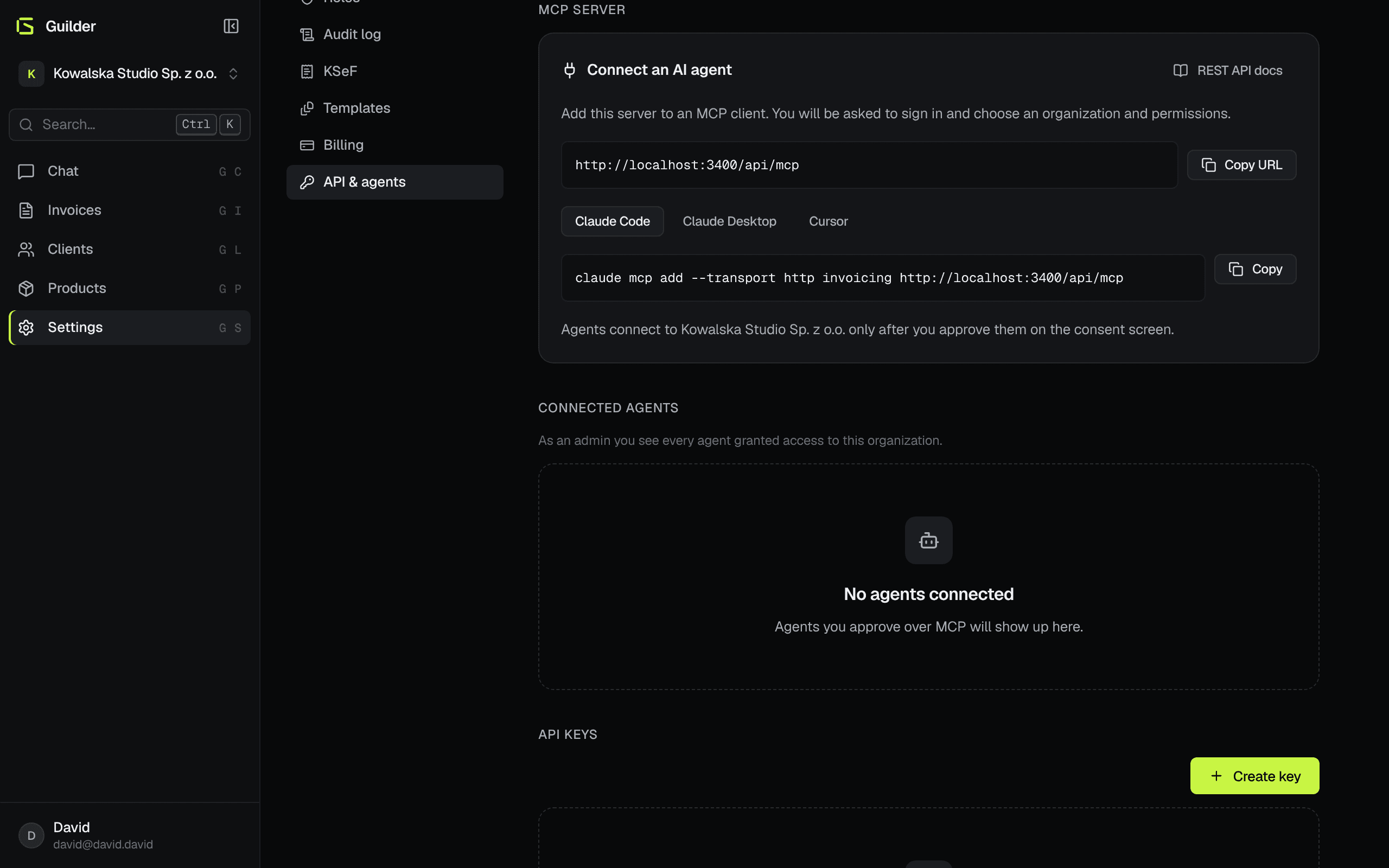
Where to find it: Settings → API & agents → the MCP server section ("Connect an AI agent"). The MCP server is part of the Pro plan.
Steps
- Open Settings → API & agents → MCP server.
- Pick a client: Claude Code, Claude Desktop or Cursor. Copy the command or use Copy URL.
- Add the server in your MCP client. You will be asked to sign in.
- On the authorization screen choose the Organization and scopes: Read, Write, Send to KSeF, Manage organization.
- Click Allow access (or Deny). Scopes your role cannot use are disabled.
- Connected agents appear in the Connected agents section. Revoke removes access.
What an agent can do
- List and read invoices, clients, products, members and plan usage.
- Create and fix drafts, record payments, get a PDF link.
- Issue invoices and send them to KSeF. Both tools need an explicit confirmation (
confirm: true) and the right scope. - Work with client documents:
list_document_templates,save_document_template,list_documents,get_document,create_document,update_document,start_client_onboarding,get_client_onboarding,toggle_checklist_item,mark_document_statusandcreate_invoice_from_sow(Read and Write scopes). - Finalize a document (
finalize_document) and e-mail it to the client (send_document). Both needconfirm: true, a role allowed to issue invoices and the Write scope (client documents). - Track time:
list_projects,save_project,log_time,list_time_entries,update_time_entry,delete_time_entry,get_unbilled_time,preview_time_invoiceandcreate_invoice_from_time(Read and Write scopes).log_timeaccepts text such as1h30m. Project and billing tools need a role that manages time; the invoice is created as a draft (time tracking). - Invite members (Manage organization scope).
Tips
- An agent's permissions are the intersection of its scopes and your role in the organization.
- Sending to KSeF is irreversible. The agent should ask you before it calls the tool.
- On the Free plan you can add the connection, but tools will ask you to upgrade (plans).
- You can also revoke access under Account → Connected agents (the "Open API & agents" button).
Related articles
- API keys and the REST APICreate an API key at Settings → API & agents → Create key (Pro plan) and call the REST API at /api/v1 with an Authorization: Bearer header. A key shows once.
- AI assistant: invoicing from chatThe assistant in the Chat menu drafts invoices, finds clients and runs summaries; issuing, KSeF sending and payments need your confirmation on a card.
- Team and roles: invitations and permissionsInvite people at Settings → Members → Invite people; a role (owner, admin, accountant, member, viewer) decides what they can issue and change.
- Time tracking: log hours, projects and bill hoursLog hours in the time ledger, group them in projects with a rate and budget, then bill unbilled hours as a draft invoice with a timesheet PDF.